Menu
×
Tutorials Ms Word Tutorial Ms Excel Tutorial Ms PowerPoint Tutorial C Language Tutorial C++ Tutorial C Sharp Tutorial Visual Basic Tutorial HTML Tutorial CSS Tutorial JavaScript Tutorial WordPress Tutorial
     ❯   

ADVERTISEMENT

How to use SUMIF Function in Excel | SUMIF Formula | Using SUMIF | Excel Tutorial

How to use SUMIF Function in Excel | SUMIF Formula | Using SUMIF | Excel Tutorial

Description

The SUMIF function is a pre-defined function in Excel, Gives the SUM of cells in a range that meet one or more criteria. You can use SUMIF to SUM cells as per criteria , SUMIF support logical operators (>, <, <>, =) and partial match wildcards (*, ?).

Syntax

The syntax for SUMIF() looks like this:

=SUMIF(range, criteria, [sum_range])

  • range – Range to apply criteria to.
  • criteria – Criteria to apply.
  • sum_range – [optional] Range to sum. If omitted, cells in range are summed

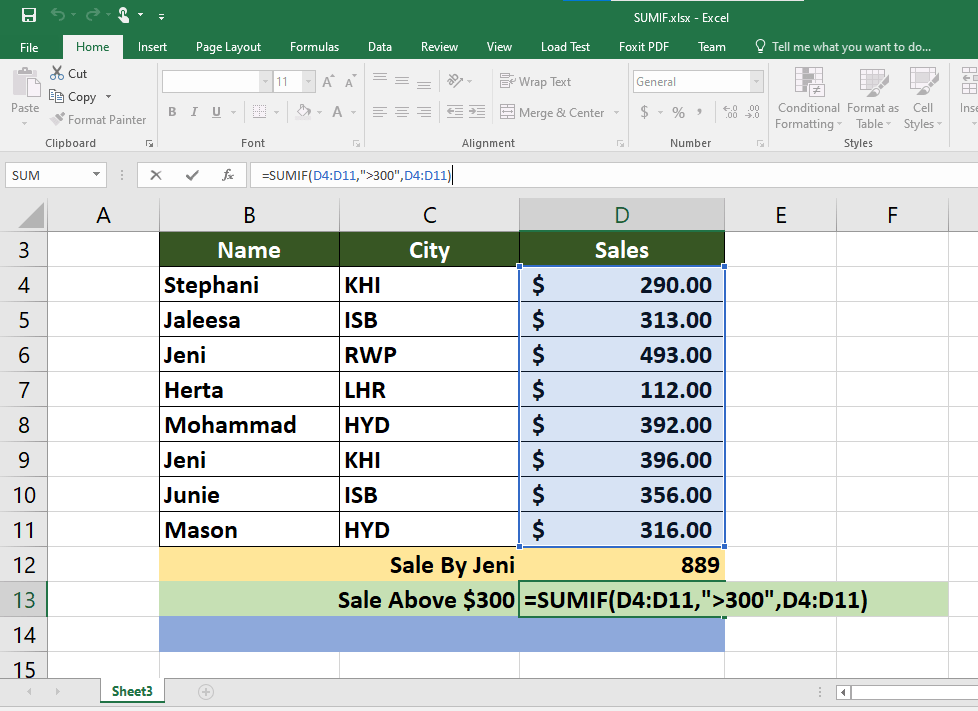
Example 01:

Example 02:

Spread the love
Scroll to Top
Scroll to Top