
Adding items to the status bar
The status bar is located at the bottom of the Office 2019 environment. It displays information about the current file you are working on and provides quick access to some tasks.

The status bar is located at the bottom of the Office 2019 environment. It displays information about the current file you are working on and provides quick access to some tasks.
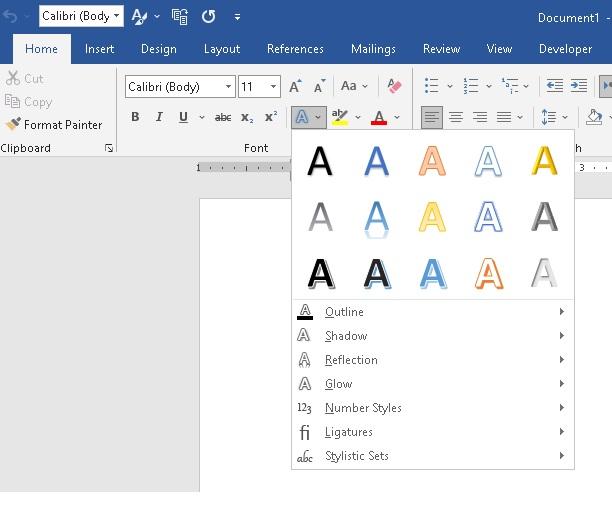
Introduction Microsoft Word is a versatile tool that goes beyond basic text editing. Turn ordinary documents into visually stunning works of art. In this step-by-step guide, we’ll walk you through the process of adding text effects to your Microsoft Word documents, unlocking your creative potential, and making your content stand out. The text effects and …

Font Type Font Size Bold, Italic, Underline When you observe that a formatting control (such as bold, italic, or underline) appears selected, it indicates that the option is already active on the chosen text or paragraphs in the document To remove the formatting, simply select the paragraph or text that has the formatting applied to …

When working on a document, you may find yourself wanting to replicate specific formatting styles to maintain consistency. The ability to copy multiple formats in Microsoft Word can save time and effort, especially when dealing with lengthy documents. In this comprehensive guide, we will explore how to duplicate formats and streamline your document creation process …

Microsoft Word provides numerous options to customize the appearance of your text, allowing you to create visually appealing and professional-looking documents. One of the most powerful tools for text formatting is the Font Dialog Box or Font Attributes. This feature enables you to modify font styles, sizes, colors, and effects, giving you complete control over …

To allow more space to work with documents, simply fold away or minimize the ribbon. This can be achieved in more than one way:
We use the ruler bars (vertical and horizontal) in Word 2019 to measure and set the distance between tabs, margins, the page layout, and the header and footer distances.

Among these features are tabs and groups, which allow you to organize your documents and streamline your workflow.

In today’s fast-paced digital world, efficient document management and productivity are crucial.

The Microsoft Word title bar is located at the top of the application window and provides users with essential information and controls.
Word is a powerful tool that can be used to create a variety of documents, including letters, reports, presentations, and more.

An operating system is a collection of operative programs that provide an interface for the user to interact with the computer. An operating system performs basic tasks such as……
An operating system (OS) is a set of computer programs that manage the hardware and software resources of a computer.
Q. What is an Operating System? What is its purpose? Discuss types of Operating Systems. Operating System: An operating system (OS) is a set of computer programs that manage the hardware and software resources of a computer. An operating system performs basic tasks such as: Purpose/Objectives Of Operating System: There can be many objectives of …
Chapter – 7 [Operating Systems (Windows)]- Notes Read More »
Understanding the Importance of Security and Copyright Laws in the Digital World. Security refers to the protection of information and systems from unauthorized access, use, disclosure, disruption, modification, or destruction. It is important to maintain security to prevent sensitive information from falling into the wrong hands, protect intellectual property, and ensure the integrity of systems …
Chapter – 6 [Security, Copyright laws]- Short Questions & Answers Read More »
MCQs (Multiple Choice Questions) and blanks are two types of assessment formats commonly used in educational settings. Multiple Choice Questions are a type of question that presents several options or choices for the student to select the correct answer from. The question typically begins with a stem or statement, followed by several options or choices. …
Chapter – 6 [Security, Copyright laws]- MCQs and Blanks Read More »
Q. What is a computer crime? Explain its types. Computer Crime Any crime committed using computer technology and networks are referred to as computer crime or cybercrime. Undoubtedly a criminal offense, cybercrime is sanctioned by the law. Cybercriminals create various plans and programs to attack computers and systems. There are several types of computer-related crimes. …
MCQs (Multiple Choice Questions) and blanks are two types of assessment formats commonly used in educational institutes.
“Explore the fundamentals of Computer Architecture with a focus on CPU, Main Memory, I/O devices, and Secondary Storage Devices. Learn about the key components of computer systems such as Registers, Bus Interconnection, RAM, ROM, and Cache Memory. Discover the essential roles of CU and ALU and how they work together in processing data. Get familiar …
Chapter – 5 [Computer Architecture]-Short Questions And Answers Read More »
“Explore the fundamentals of Computer Architecture with a focus on CPU, Main Memory, I/O devices, and Secondary Storage Devices. Learn about the key components of computer systems such as Registers, Bus Interconnection, RAM, ROM, and Cache Memory. Discover the essential roles of CU and ALU and how they work together in processing data. Get familiar …
MCQs (Multiple Choice Questions) and blanks are two types of assessment formats commonly used in educational settings. Multiple Choice Questions are a type of question that presents several options or choices for the student to select the correct answer from. The question typically begins with a stem or statement, followed by several options or choices. …
Chapter – 4 [Applications And Use Of Computer]-MCQs And Blanks Read More »
Q. What is the use of computer in Marketing? Marketing is the process by which goods are sold and purchased. The aim of marketing is to acquire, retain, and satisfy customers. Marketing applications help managers to develop strategies that combine the four major elements of marketing i.e. Product, Promotion, Place and Price. Q. What …
Chapter – 4 [Applications And Use Of Computer]-Short Questions And Answers Read More »
Q. How are computers used in the field of banks? Computer In Banks Banks use a wide range of computers to carry out regular, day-to-day operations. Computers allow banking staff to efficiently carry out transactions, process customer needs, forecast future trends, prepare internal and external reports, communicate with key participants and generate profits. Banking computers …
Chapter – 4 [Applications And Use Of Computer]-Notes Read More »
MCQs (Multiple Choice Questions) and blanks are two types of assessment formats commonly used in educational settings. Multiple Choice Questions are a type of question that presents several options or choices for the student to select the correct answer from. The question typically begins with a stem or statement, followed by several options or choices. …
Chapter – 3 [Data Communications]- MCQs & Blanks Read More »
Q. What is data communication? Ans. Data communication is the exchange of data between two devices via some form of transmission media or Data communication transfer of data or information from one location to another is called data communication or the movement of encoded information by means of an electrical transmission system from one computer …
Chapter – 3 [Data Communications]- Short Questions & Answers Read More »
Q. What is DATA? What are the Types of DATA? Data Types of data: Text: Numeric: Image: Audio: Video: Q. What is Data Communication? What are the components of Data Communication? Data Communication: or or Components of Data Communication: There are five components of data communication. Message: Sender: Receiver: Communication channel: Encoder and Decoder: Q3. …
LAN. WAN, MAN, Computer Networks, Information Networks, Internet, Internet Network Choose the Correct Option: A LAN is a combination of: Network Adapter Cards LAN Application Software LAN Cables ALL of the above A collection of computers connected together is called: Processing Network Chatting None Central computer in the network is called: Client …
Chapter – 2 [Information Networks]- MCQs & Blanks Read More »
LAN. WAN, MAN, Computer Networks, Information Networks, Internet. Q. What are the technologies involved in information networks? Ans. Information networks or computer networks are the convergence of two technologies, Computing and Telecommunication. This convergence resulted in LAN (Local area Network), MAN (Metropolitan Area Network), WAN (Wide Area Network) and the Internet. The most popular information …
Chapter – 2 [Information Networks]- Short Questions and Answers Read More »
LAN. WAN, MAN, Computer Networks, Information Networks, Internet. Q. What are information networks? Information Networks: The main advantages and disadvantages of a computer network are Advantages Disadvantages Sharing files becomes easy. A hacker can get unauthorized access to files. Sharing of equipment becomes easy. The cost of implementing a network is high Communication between two …
MCQs (Multiple Choice Questions) and blanks are two types of assessment formats commonly used in educational settings. Multiple Choice Questions are a type of question that presents several options or choices for the student to select the correct answer from. The question typically begins with a stem or statement, followed by several options or choices. …
Chapter – 1 [Basic Concepts Of Information Technology] – MCQs & Blanks Read More »
Q. What is a computer? Ans. The computer is an electronic device or programmable machine that accepts data, processes it into useful information according to the instructions given to it, and gives output. It can store processing data on secondary storage devices for later use. There are four functions in this definition: Q. What is …
Chapter – 1 [Basic Concepts Of Information Technology] Short Questions And Answers Read More »
What is a computer? What are the characteristics of a computer? A computer is a machine or device that performs processes, calculations, and operations based on instructions provided by a software or hardware program. A computer has the following characteristics There are four functions in this definition: Functions of a computer: Input: Everything we give to …
Chapter – 1 [Basic Concepts Of Information Technology] Read More »

A storage device is used for storing of data files and objects.
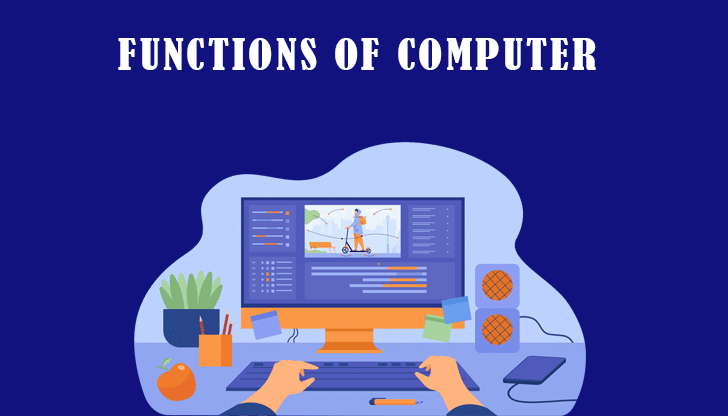
There are four functions in this definition, Input, Processing, Output, and Storage

C++ is a general-purpose, object-oriented programming language that was created by Bjarne Stroustrup in 1983 as an extension of the C language.

The word “computer” is a device capable of calculation. But modern computers can do much more.
The term application refers to software that is a set of programmed instructions or code to perform a task or operation on a computer.
Due to its popularity and flexible features, it was soon released for cross-platform use and quickly became commercialized. C is still commonly used in web development projects, and many popular languages, such as Java, PHP, and JavaScript have directly or indirectly syntax from C.

CSS allows you to control things like colors, fonts, text size, spacing between elements, placement and placement of elements, what background image or color to use, and how it looks differently on different devices and screen sizes.

HTML, or Hypertext Markup Language, is a web markup language that defines the structure of a web page.

If you frequently create or edit Word documents, take the time to learn MS Word keyboard shortcuts. Below, we’ll show you some of the best. As a bonus, many of these shortcuts also work in other Microsoft Office applications such as Excel and PowerPoint.
Although this shortcuts tutorial is primarily aimed at Windows users

Dev-C++ is a full-featured Integrated Development Environment (IDE) for the C/C++ programming languages. It was developed by Bloodshed Software, but is no longer being actively maintained. It includes a compiler, debugger, and an editor, among other features, and allows users to write and edit C and C++ code, and then compile and run that code on their computer. Dev-C++ is free to download and use, and is available for Windows operating systems. It is a popular choice for beginners learning to program in C and C++, due to its simplicity and ease of use.

Using drop-down lists to restrict what users can enter in cells makes data entry faster and more accurate. When someone selects a cell, a dropdown list down arrow appears that they can click to select.

This video covers the basics of the SUMIF function in Excel. Learn how to use this function to SUM the number of cells that contain a specific value. This is a great function for data analysis and can help you find trends in your data.

The Attendance Sheet is a tool for recording the daily regularity of students, teachers and staff.

This video covers the basics of the COUNTIF function in Excel. Learn how to use this function to count the number of cells that contain a specific value. This is a great function for data analysis and can help you find trends in your data.

Learn how to use the COUNTA function in Excel and Count cells, tallying the Text, number, None blank or None empty cell. The amazing thing about Excel is that you can use it for so many things, not just for making spreadsheets.

Learn how to use the count function in Excel and Count cells, tallying the numbers in cells with only numbers. The amazing thing about Excel is that you can use it for so many things, not just for making spreadsheets.

In this video you will learn, How to Group and Ungroup Worksheets in Excel | changes made in multiple sheets | grouping worksheets
This tutorial will show you how to group and ungroup worksheets in Excel, so that all the worksheets are grouped or ungrouped at the same time.
